Brand Bar: a progress bar you can brand
A brandable progress-bar plugin for JetBrains IDEs: fork it, swap one folder of art and colours, and ship your own skin.
Brand Bar is a progress-bar plugin for IntelliJ-based JetBrains IDEs that you can rebrand as your own. Fork the repository, replace one folder of artwork and colours, rebuild, and your logo or mascot runs along the bar instead of the standard fill. It is open source under Apache-2.0, and this note is the short tour: what it does, who it is for, how to install it, and how to make it yours.
Overview
- What: a custom
ProgressBarUIfor JetBrains IDEs (IntelliJ IDEA and the other IntelliJ-based tools), driven entirely by files insrc/main/resources/brand/. - Who: a team that wants its own branding inside the IDE, or one person who wants their editor to feel like theirs.
- How it is shared: source on GitHub, licensed Apache-2.0. Forks keep the
NOTICEand a visible “Based on Brand Bar by Will Craig” line (see Open source below). - Needs: a JetBrains IDE from 2024.3 (
since-build243) or later, and JDK 21 if you build it yourself. - Status: version 0.1.0. There is no Marketplace listing yet, so for now you build the zip and install it from disk.

The problem it solves
The progress bar is one of the parts of an IDE you look at most: indexing, building, downloading, waiting. It also looks exactly the same for everyone. People have long skinned it for fun — the best known example is Nyan Progress Bar — but making one that carries your own brand normally means writing and maintaining a plugin of your own, including the awkward parts: determinate and indeterminate animation, HiDPI scaling, and keeping up with IDE updates.
Brand Bar is that work, done once, with the branding left blank on purpose. The plugin code stays fixed. Everything a fork is meant to change — the runner graphic, the trail, the colours, the bar’s shape and timing — sits in one folder as data, so a rebrand is an asset swap and a rebuild, not a coding project.
Who it is for
Two readers, mainly. The first is a company or team that ships software from JetBrains IDEs all day and would like the editor itself to carry the house brand — for its own developers, for screenshots and demos, or for a room full of machines at a workshop. The second is an individual who simply likes a personal editor: your initials, your club’s colours, a small picture of your own that crosses the screen while the build runs. The guide to making it yours spells out both paths, and they are the same steps at different scales.
If you do not use a JetBrains IDE, this one is not for you, and that is fine. It changes nothing about how the IDE works; it only changes what waiting looks like.
Key features
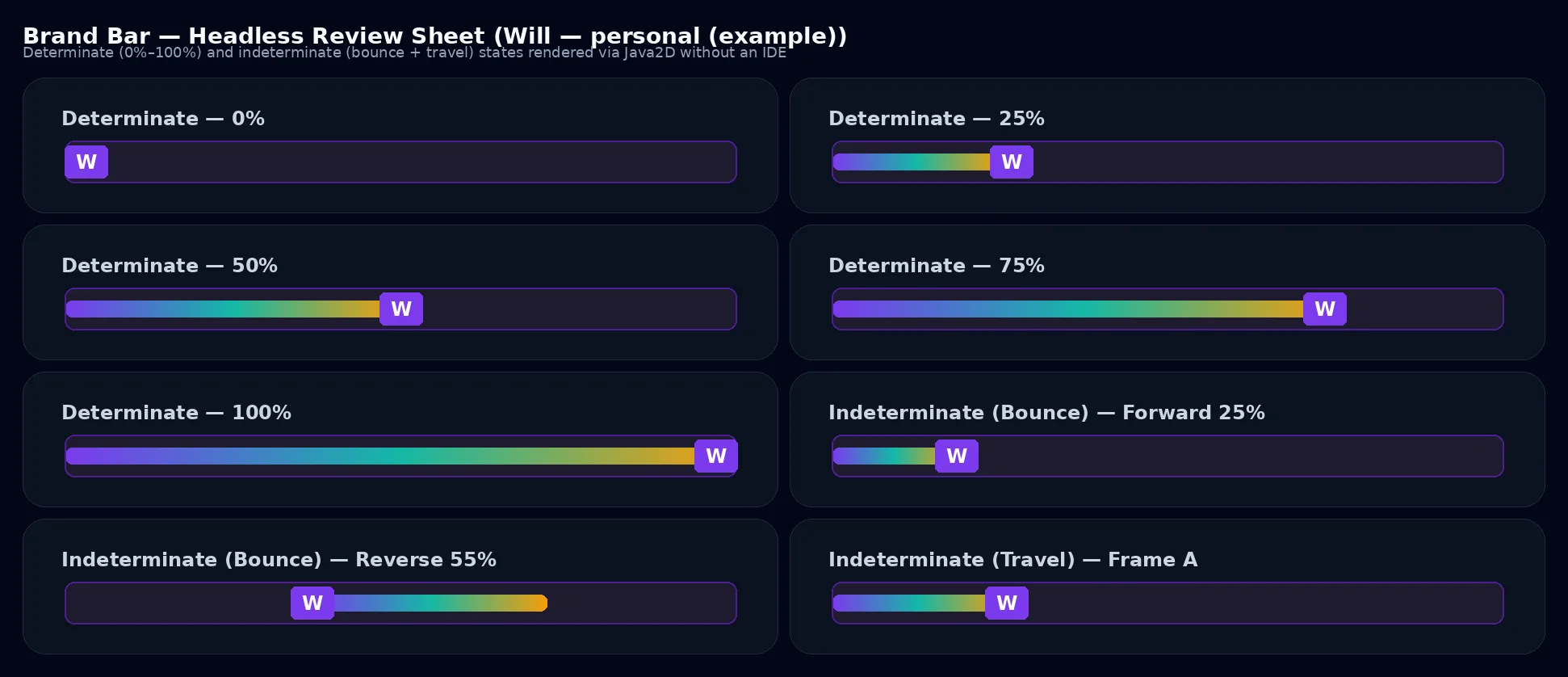
- Determinate and indeterminate bars. A known percentage fills the trail and carries the runner with it. An unknown one animates:
BOUNCEruns the runner end to end and back,TRAVELruns it left to right and wraps around. - Your runner, in your format. The moving graphic can be SVG (preferred, because it stays crisp) or PNG, with an optional
@2xfile for HiDPI displays. If it should not be mirrored when it bounces back, you can turn mirroring off or supply a separate left-moving image — useful for logos with text in them. - Trail, track and shape from a file. Trail colours as horizontal
STRIPESor a left-to-rightGRADIENT, or a tileable trail image; plus track and border colours, bar and trail heights, corner radius, and animation timing and step, all intheme.json. - Scaled by the IDE. Sizes go through JetBrains’
JBUIscaling, so the bar looks right at different display scales instead of only at the one on your desk. - Preview without opening an IDE. Gradle tasks render the bar headlessly at 0, 25, 50, 75 and 100% and in its indeterminate states, so you can check a theme from the rendered pictures alone.
- Clean-room and original. Brand Bar was written from scratch in Kotlin against public IntelliJ Platform APIs. It ships no artwork from the plugins that inspired the idea, and its bundled placeholder graphics are simple original shapes.
Install it
You need two things: a JetBrains IDE from 2024.3 or later, and, to build the plugin, JDK 21 (Temurin 21 is what the project uses). Then:
- Clone the repository:
git clone https://github.com/WillCraig/brandbar.git. - Build the plugin zip:
./gradlew buildPlugin. The zip lands inbuild/distributions/. - In your IDE, open Settings → Plugins → ⚙ → Install Plugin from Disk… and pick that zip.
- Restart the IDE if it asks. The next progress bar you see is Brand Bar’s placeholder theme, ready to be replaced.
While you are there, ./gradlew test runs the unit tests and ./gradlew renderScreenshots renders the preview pictures described above.
TODO (Will): add the JetBrains Marketplace link here if and when Brand Bar is published there. Until then, install from disk as above — please do not link a Marketplace page that does not exist yet.

Make it your own
A fork only edits src/main/resources/brand/:
src/main/resources/brand/
├── theme.json        # colours, dimensions, indeterminate animation
├── runner.svg        # runner graphic (.svg or .png; PNG may add runner@2x.png)
├── runner-left.svg   # optional dedicated reverse runner for BOUNCE mode
└── trail.png         # optional tiled trail pattern (optional trail@2x.png)
Three moves cover most rebrands. First, drop your logo or mascot in as runnerImage. Second, set the trail: one or more hex colours (#RRGGBB or #AARRGGBB) as stripes or a gradient, or a tileable trailImage (at least one of the two is required). Third, tune the rest of theme.json — track and border colours, heights, corner radius, and whether an indeterminate bar bounces or travels, and how fast. The full field-by-field table is in the README.
Preview as you go, without opening the IDE:
./gradlew renderScreenshots                              # bundled theme
./gradlew renderScreenshots -Pbrandbar.theme=examples/themes/will-craig-personal
./gradlew renderExampleScreenshots                       # all examples + gallery
The pictures land in build/reports/screenshots/ and build/reports/example-screenshots/. When they look right, ./gradlew buildPlugin and install from disk as above. The pictures in this note use the personal example theme (examples/themes/will-craig-personal/) and the bundled placeholder, because the other example themes in the repository exist only for testing and screenshots — none of them ships in the plugin zip, and no real company’s branding is used here.
A company taking this further also changes the plugin’s identity — <id>, <name> and <vendor> in plugin.xml, and the matching id/name in build.gradle.kts — and can publish the zip to a private plugin repository instead of installing it machine by machine. An individual needs none of that: copy an example theme into the brand folder, edit it, build, install. One person, one folder, no Kotlin required.

Open source, and the one request
Brand Bar is licensed under the Apache License 2.0, and the repository is at github.com/WillCraig/brandbar. Use it, fork it, skin it, ship your version inside your company. Apache-2.0 section 4(d) asks anyone who redistributes it — forks and rebranded builds included — to keep the attribution in the NOTICE file. On top of that, one request, in the same words the README uses: please keep a visible “Based on Brand Bar by Will Craig” line in your plugin description.
JetBrains and IntelliJ are trademarks of JetBrains s.r.o.; this project is not affiliated with JetBrains.
Brand Bar also has a project entry on this site, next to the other public work. If you make a skin you are pleased with, I would like to see it — email is the quickest way to reach me.